Blog
Welcome


Recent posts
SEARCH RESULTS FOR: Photojunction

It's been a while, but this year Queensberry and Photojunction are returning to PMA's Digital Life Expo in Melbourne, Australia. We love opportunities like this to meet old friends and make new ones … and we hope you’ll be among them. Queensberry is for people who believe that the way to succeed is to stand out from the crowd, not join it, and we have two new projects to talk to you about: 1. As you may know Apple chose Queensberry as one of “the world’s finest bookmakers” to introduce their album design and ordering service in Aperture 3. Far from us to say why they chose us, so come To View More >>
This entry was posted in by Admin
Here's a quick, real-life story about Photojunction's auto-save templates feature. Last week we got a slightly panicked call from a PJ user who'd lost her entire album design. Frustrating. Support treats calls like this as detective stories, and they're really good at solving them. But what happened is less important than what to do about it. She thought she'd need to totally re-design her album, but we introduced her to Photojunction's auto-save templates feature. During the design of every album you do, Photojunction auto-saves templates of your design. It's not an option you can turn on and To View More >>
This entry was posted in by Admin

By tolerances we mean the threshold at which Photojunction's Problem Reporter will report an aperture misalignment. Confusing I know, so let me explain... Photojunction detects apertures that aren't exactly aligned with each other (misalignments) and warns you about them in the Problem Reporter. Because misalignments show up as 'Warnings' in the Problem Reporter you could ignore them and move on to send the order if you wanted. However we strongly recommend checking and resolving any reported misalignments as a slight aperture misalignment (say 1-2mm) is probably not deliberate, and will probably To View More >>
This entry was posted in by Admin
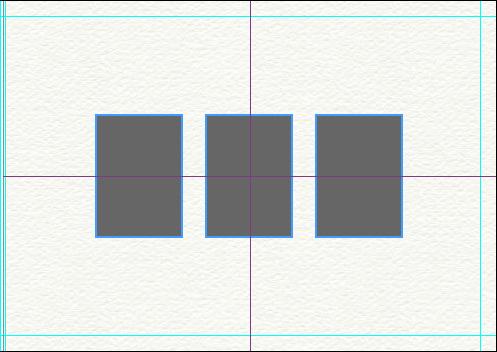
A couple of changes have been made to the way templates operate, making them even smarter than they already were. Here's the low-down... 1) When dropping a template onto a layout, Photojunction no longer Groups the apertures, which should make templates easier to understand for any users who haven't come to terms with Groups yet. Photojunction automatically scales and centers the template on the layout for you. That'll make editing a whole lot quicker and easier. 2) When using a Queensberry Duo template, Photojunction remembers which apertures were Matted and which were Digital. As with all templates, To View More >>
This entry was posted in by Admin
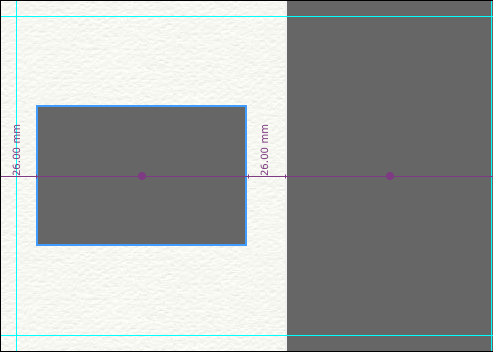
We introduced Smart Centering in release 1.32, and you told us you loved it. So in 1.39b, we've made Smart Centering a whole lot smarter. Photojunction now Smart Centers apertures in the remaining available space on a layout. Here's an example of a split mat (Fill Full Height or Fill Full Width) aperture layout. The smaller of the two apertures has been centered in the remaining available space on the mat, as the measurements and purple alignment line indicates. You can also hover your mouse over the 'Align to page centre' button in the Tools window to find the center of the remaining available To View More >>
This entry was posted in by Admin
Danny and I are back from honeymooning (not together - just Danny ;)) and holidaying (me) so our regular Photojunction webinars are back! Next up: Intro to Photojunction - Thursday 6 May @ 9am (NZT) These webinars are the absolute easiest way to get up and running with Photojunction, so if you’re a new PJ convert, or just want a good PJ refresher, join us on Thursday. Click here to register for this free webinar. Hope to see you there! Cheers, Nigel PS 9am NZT means... AUSTRALIA - Thursday 6th May 7:00 AM NEW ZEALAND - Thursday 6th May 9:00 AM UK - Wednesday 5th May 10:00 PM USA (West Coast) To View More >>
This entry was posted in by Admin
Psst... Photojunction's just snuck out another beta release, 1.39b! I feel like we say this every time we blog about a new release, but it's another biggie. There's way too much new PJ goodness in 1.39b to show you in one post, so keep tuned for our next series of 1.39b feature posts over the next couple of weeks. Before we go though, here's a little of what to expect in 1.39b... Work's been done to improve the Alignment features (Smart centering in particular), we've changed the way templates operate (for the better), and we've given you even more control by adding a few new features to the Preferences To View More >>
This entry was posted in by Admin

We met Jeff Youngren and his wife Erin (The Youngrens) a couple of years ago at WPPI and they've been on board with PJ ever since. Danny's received numbers of calls from Jeff about ideas for new Photojunction features, and it was one of those that is partly to thank for the new integration of albumexposure with Photojunction. 1) How do you like the albumexposure online album proofing feature? Why should others try it out? "To me, the Albumexposure/PJ integration is a game changer in the industry - never before has something so common been integrated so well into the whole design process. I'm blown To View More >>
This entry was posted in by Admin

Man about town Jerry Ghionis is a great supporter of Photojunction and spreads the word through his various speaking engagements. 1) What sort of feedback do you hear about Photojunction? After many years of not doing my own album plans, I have now gone back to designing my albums again. Since I now run a boutique studio, my involvement in the pre-production and album design process is very important. Not being a technically minded person naturally, I downloaded the trial version of Photojunction and pretty much learned how to use it in about 10 minutes. What I noticed immediately about it To View More >>
This entry was posted in by Admin

We don't know many people who know their way around Photojunction better than Chip Gillespie. Especially when it comes to shortcuts. We call him a Power User. (He's also the founder of Blogstomp, which is well worth checking out.) 1) You're a PJ power user – how long have you been using Photojunction and what attracted you to it in the first place? I have been using PhotoJunction for a little over a year. To be truthful, I was skeptical at first as I had what I believed to be a near-perfect album design process using Photoshop. On the recommendation of a friend and fellow photographer/designer, To View More >>
This entry was posted in Uncategorized by Admin